
Aircraft Spruce Australia
Melbourne, VIC Australia
 Aircraft Spruce Australia
- Wishlists
- +61 (1800) 953522
- Contact Us


 Contact Us
 Call Us
 Sign In
- Photo may represent series and not specific product
- SHARE


Desktop Satellite Weather Display - 7-in Touchscreen Radar & Alerts Monitor - White
Overview
|
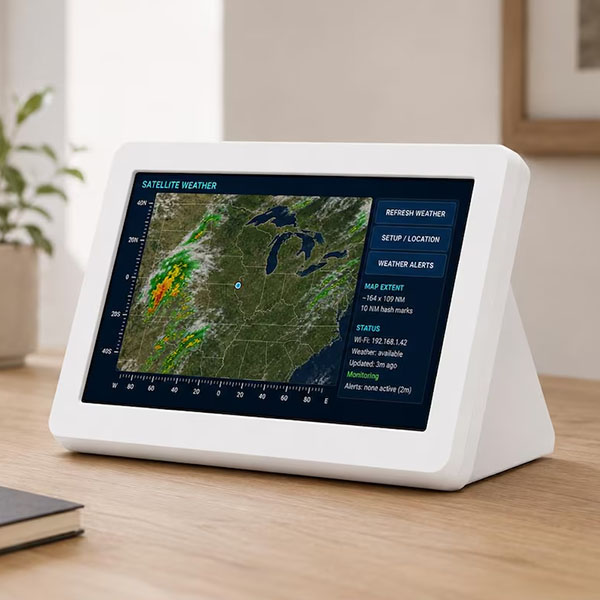
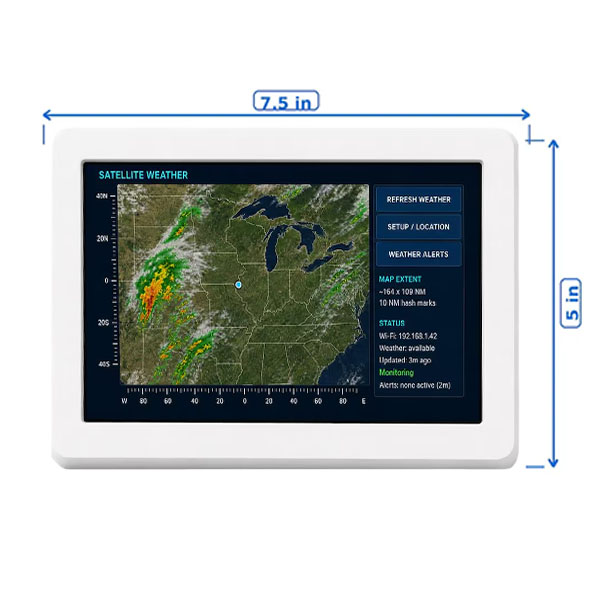
A younger sibling of my Local Air Traffic device: The weather for so useful I thought maybe a device for someone who isn't interested in air traffic - perhaps strip that out, add alert notification as well as temperature and conditions! Keep local weather visible all day with a dedicated 7-inch touchscreen display designed for your home, office, workshop, kitchen, nightstand, or family room. This device shows a satellite-style weather map centered on your chosen location, with precipitation/radar overlay, distance rulers, weather status, Wi-Fi status, update information, and active weather alert monitoring. Yes, phone apps are great. Many of them are prettier, more detailed, and more interactive.But a phone app only helps when someone opens it. This display is different. It is designed to sit where people can see it — always on, always visible, and always focused on the location you care about. Put it on a kitchen counter, bedroom nightstand, office desk, garage shelf, basement table, or family room cabinet. Kids can glance at nearby storms. Parents can keep an eye on changing weather. Elderly family members can see alerts without needing to unlock a phone or dig through notifications. Weather AlertsThe device monitors active National Weather Service alerts for the configured location. The Standard unit monitors 1 location. The Plus model contains additional storage and allows you to switch between up to 10 predefined locations! When an alert is detected, the display can show active alert details including the alert type, severity, affected area, end time, description, and instructions. The device also supports audible alert notification when a new alert is detected. |
Features
- Satellite-style map centered on your configured location
- Radar/precipitation overlay
- Temperature
- Conditions (Sunny, Runny, Cloudy, etc)
- Center marker showing your selected location
- North/south and east/west distance rulers
- Map extent information
- Wi-Fi connection status
- Weather update status
- Time since last update
- Active alert status
- Touchscreen buttons for refresh, setup, and alerts
- The weather map refreshes automatically every 10 minutes, and weather alerts are checked every 7 minutes.
Important Safety Notice
- This device is intended as a supplemental weather display only.
- It should not be used as your only source for severe weather warnings, emergency alerts, or life-safety decisions. Weather alert checks occur approximately every 7 minutes, and updates depend on Wi-Fi, internet access, server availability, and outside weather data sources.
- During severe weather, always rely on official sources such as:
- NOAA Weather Radio
- Local emergency alerts
- Outdoor warning sirens
- Local TV/radio weather coverage
- Official National Weather Service information
- Your phone’s emergency alert system
Setup
- Setup is handled through a temporary Wi-Fi setup screen. During setup, you can choose your Wi-Fi network and configure the location using an address, place name, landmark, airport, or direct latitude/longitude.
Once configured, the device automatically connects to Wi-Fi and displays weather for that location.
Important Safety Notice
This device is intended as a supplemental weather display only.
It should not be used as your only source for severe weather warnings, emergency alerts, or life-safety decisions. Weather alert checks occur approximately every 7 minutes, and updates depend on Wi-Fi, internet access, server availability, and outside weather data sources.