
+61 (1800) 953522 | info@aircraftspruce.com.au
Aircraft Spruce Australia
Melbourne, VIC Australia
Aircraft Spruce Australia
Melbourne, VIC Australia
 Aircraft Spruce Australia
- Wishlists
- +61 (1800) 953522
- Contact Us


 Contact Us
 Call Us
 Sign In
 THE AVIATION SUPERSTORE FOR ALL YOUR AIRCRAFT & PILOT NEEDS | +61 (1800) 953522
- Photo may represent series and not specific product
- SHARE



Radiant SafeAlt Portable Altimeter / VSI Combo
Select Case Color:
OrangeBlackPrice Includes GST
- JUMP TO
- Overview
- Documents
- Accessories
- Reviews
- Q&A
Overview
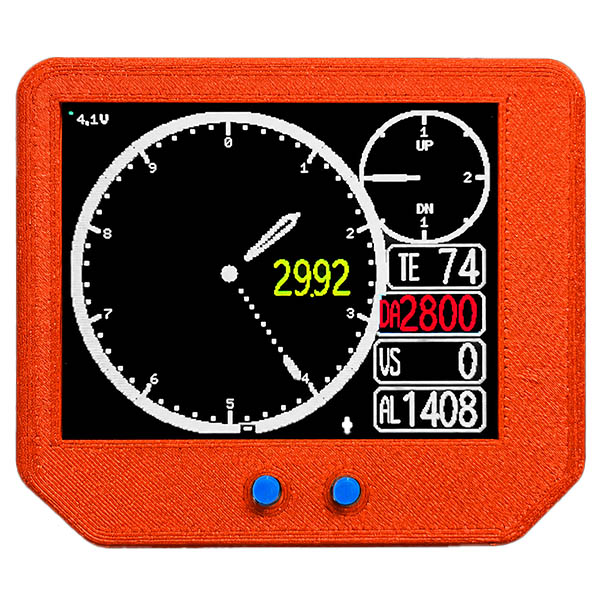
**NOT FAA APPROVED - FOR USE IN EXPERIMENTAL AIRCRAFT ONLY**Altitude, made useful. SafeAlt puts the information that matters most in flight where it belongs: front and center. It is a portable altimeter, vertical speed indicator, temperature display, and density-altitude computer built around one purpose—giving the pilot accurate, easy-to-read, immediately useful altitude information. A classic dual-needle altimeter provides the familiar visual picture. A large digital window gives the exact altitude. Vertical speed is shown both digitally and on its own analog gauge. Outside-air temperature and density altitude remain visible at the same time, so the pilot does not have to change screens, scroll through menus, or remember what was displayed a moment ago. Available in two case colors: SafeAlt — Orange Case SafeAlt — Black Case The electronics, display, and performance are identical. Choose the color that fits your cockpit. Everything about altitude—in one clear instrument Altitude is not a single number. The useful picture includes where you are, whether you are climbing or descending, how quickly altitude is changing, what the air temperature is doing, and what that temperature means for aircraft performance. SafeAlt brings that complete picture together: Classic dual-needle altimeter Large digital altitude display Analog and digital vertical speed Live temperature display Continuously calculated density altitude Settable digital Kollsman window Battery-voltage display Automatic low-battery dimming Day and night brightness modes Full U.S. and metric operation Altitude is the hero SafeAlt was designed so the pilot can understand the aircraft’s vertical situation at a glance. The large analog dial gives an immediate sense of altitude and movement. The digital altitude window provides precision. The VSI answers the next question—are we climbing, descending, or holding? Temperature and density altitude complete the picture by showing how the atmosphere may affect takeoff and climb performance. There are no pages to navigate during normal operation. The most useful information stays visible together. That makes SafeAlt especially valuable for: Ultralight and experimental aircraft Aircraft with limited panel space Portable cockpit use Backup altitude awareness Pilots who prefer a traditional instrument presentation Operations where density altitude deserves attention before takeoff A familiar altimeter—without the plumbing At the center of SafeAlt is a familiar dual-needle altimeter display, supplemented by a large digital altitude value. A yellow digital Kollsman setting floats inside the dial, much like the adjustment window on a conventional panel altimeter. Tap the left or right button to adjust the setting. Tap both buttons to return instantly to standard pressure. SafeAlt stores the Kollsman setting and restores it the next time the instrument is turned on. The 2026 update also adds a stored Altitude Adjust setting. This allows the instrument to be trimmed against a trusted reference by as much as ±500 feet. Once set, that correction is retained in memory and is also applied to the density-altitude calculation. Vertical speed you can see two ways SafeAlt displays vertical speed on both a small analog gauge and a dedicated digital readout. The analog gauge gives the pilot an immediate sense of direction and trend. The digital window provides the actual rate. The gauge can be configured for either: ±2,000 feet per minute, for general flying ±1,000 feet per minute, for twice the needle sensitivity in slower-climbing aircraft The digital VSI continues reading beyond the analog gauge range, up to ±9,999 feet per minute. Metric mode provides meters per second. Density altitude without the guesswork Density altitude can have a major effect on takeoff distance and climb performance, yet it is often estimated from separate instruments, charts, or phone applications. SafeAlt calculates density altitude continuously from pressure altitude and measured temperature, then displays it in its own red window. The temperature used for the calculation is shown directly above it. You can see the input and the result at the same time. A one-time temperature trim allows the displayed temperature to be matched to a reference thermometer. For the best preflight density-altitude information, allow the instrument to acclimate to outside air and keep it out of direct sunlight. Designed to be read, not operated SafeAlt’s normal controls are deliberately simple: Tap LEFT Decrease the Kollsman setting. Tap RIGHT Increase the Kollsman setting. Tap BOTH Return to standard pressure: 29.92 inHg or 1013.5 hPa. Hold LEFT Switch between day and night brightness. Less-used settings—including units, VSI scale, altitude adjustment, and temperature trim—are kept in a separate setup menu. Once configured, SafeAlt behaves like an instrument, not a computer. Battery information that stays visible Battery voltage appears continuously in the upper-left corner of the display. A full battery reads approximately 4.2 V. As the voltage approaches 3.5 V, it is time to recharge or connect USB power. Below the low-battery threshold, SafeAlt automatically dims the display to conserve power and provide an unmistakable visual cue. The instrument can also be operated continuously from USB power. U.S. or metric—one setting changes everything Select U.S. or metric operation in the setup menu. U.S. mode Inches of mercury Feet Feet per minute Degrees Fahrenheit Density altitude rounded to 100 feet Metric mode Hectopascals Meters Meters per second Degrees Celsius Density altitude rounded to 50 meters The entire instrument changes together, including the Kollsman setting, altitude, VSI, temperature, and density altitude. |
Documents

Reviews
Previous review was mistake. The product turns on. Sorry for that.
Ichiro A
 Verified Purchase
Verified Purchase
Radiant SafeAlt Portable Altimeter / VSI Combo - Black Case
July 14, 2026
I simply like Radiant products I have plans to dash up my cluster with their other instruments.
Kelly N
Verified Purchase
Verified Purchase
Radiant SafeAlt Portable Altimeter / VSI Combo - Black Case
June 6, 2026
Nice, light weight, and easily mountable. I attached a sticky back hook n loop tape to the backside. I wish it were a little brighter for daytime use in my Quicksilver open cockpit ultralight.
Steven K
Verified Purchase
Verified Purchase
Radiant SafeAlt Portable Altimeter / VSI Combo - Black Case
April 29, 2026
Great way to check density altitude before every takeoff in mountains
Keith T
Verified Purchase
Verified Purchase
Radiant SafeAlt Portable Altimeter / VSI Combo Orange Case
August 14, 2025